

What Apple announced at WWDC
This year's keynote ran about 75 minutes and covered three big themes: a rebuilt Siri, a serious performance overhaul, and a major rework of parental controls.
Siri AI
Apple has renamed and rebuilt Siri from the ground up. It's now "Siri AI," and the idea is that it actually understands your life (your messages, emails, photos, calendar and much more) and can act across all of them at once.
Here's an example: you ask Siri to build a dinner party invitation, pull a recipe from an old email a friend sent you, and send it to a group. Siri strings all of that together without you having to open three apps and copy-paste anything.
If that sounds familiar, it's because Apple promised almost exactly this at WWDC 2024, and then it didn't ship.
The encouraging part is that Apple seems to have finally done the hard engineering work underneath. The demos this year looked genuinely good, and the features appeared to work as Apple said they would. More importantly, early testers have been really impressed with Siri AI.
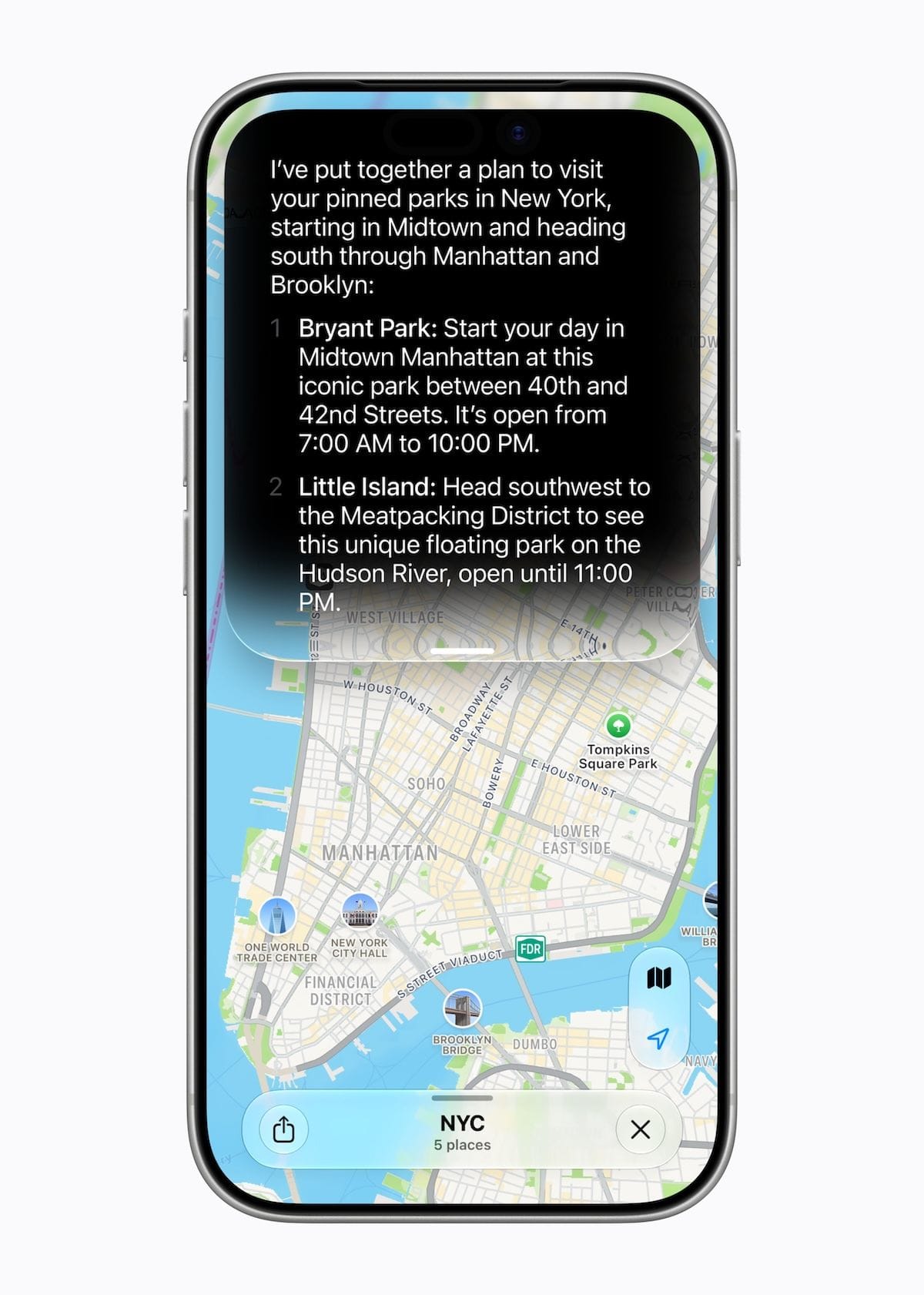
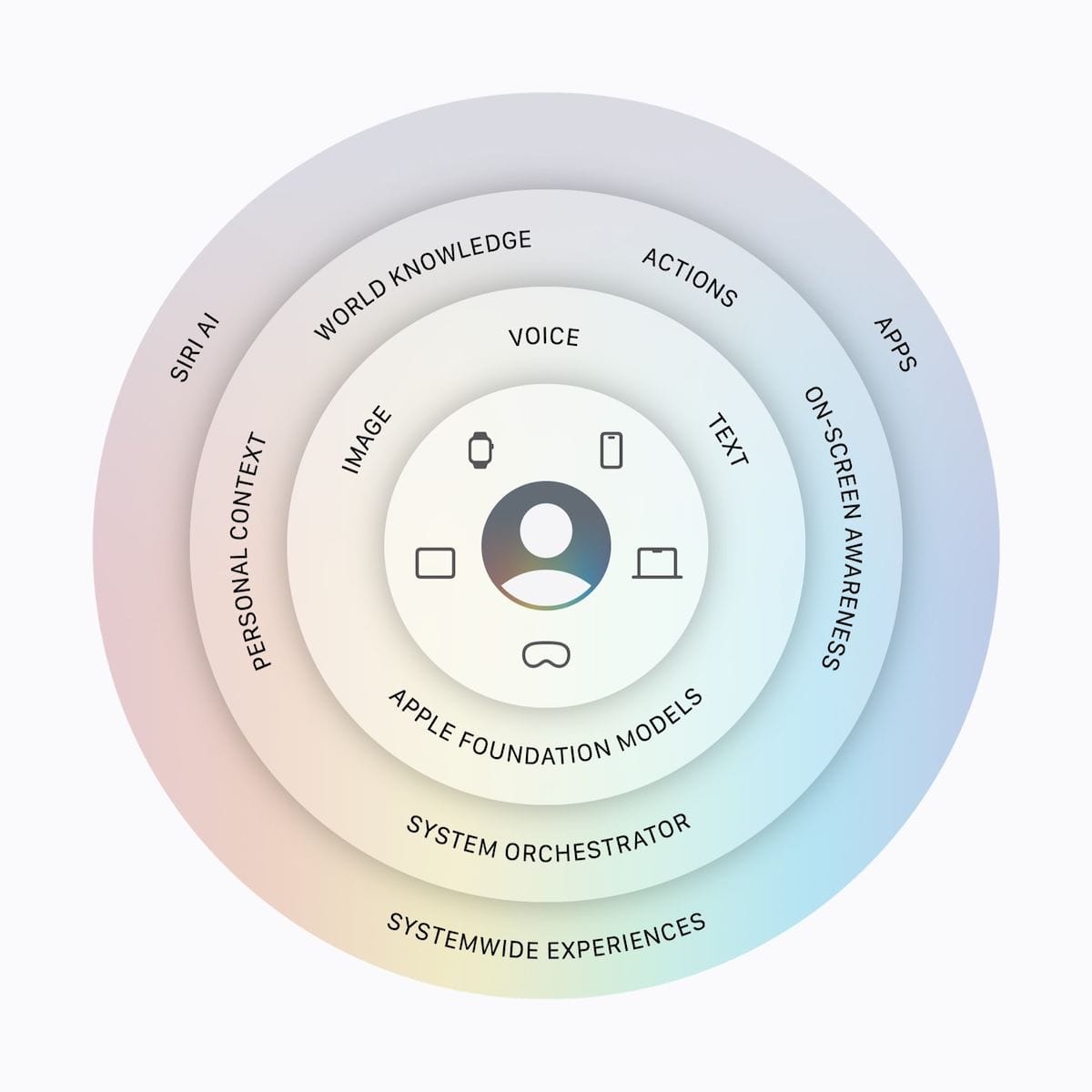
Siri AI is embedded throughout the system: it knows your apps, files, messages, email, photos, calendar, and more. It also has on-screen awareness, meaning it can work with what you're looking at. You can speak to it or type.
As another example, let's say you have a note in the Notes app where you've been collecting information for an upcoming trip. The note also includes a packing list and tasks you need to complete before the trip.
You could copy and paste those lists into Reminders so you can mark them off as you do them. But instead, now while you're looking at the lists in the note, you can tell Siri AI to add them to Reminders, and it will.
A few other Siri notes:
- There's now a standalone Siri AI app that supports ongoing conversations and keeps a history (for 30 days, 1 year, or forever).
- On iPad and Mac, Siri AI is now built into Spotlight, so it's one interface instead of two.
- You can customize Siri's voice (speed, tone, accent) on newer devices.
Now, the supported hardware question, because there's been some confusion on the socials around this.
The headline features (personal context, on-screen awareness, the multi-step requests) run on the full Apple Intelligence device list, shown here:
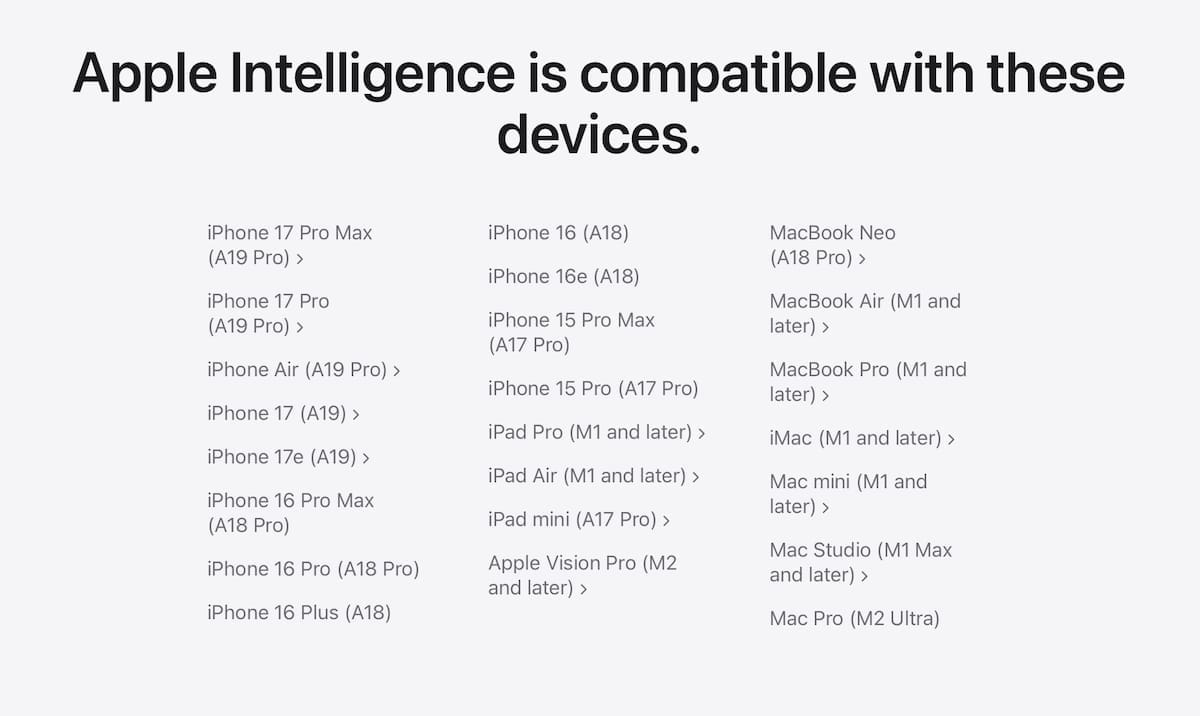
Two new features (more expressive, customizable voices and more accurate dictation) are limited to iPhone 17 Pro, iPhone 17 Pro Max, iPhone Air, iPad models with M4 and later and at least 12GB of unified memory, and Mac models with M3 and later and at least 12GB of unified memory.
Photos, Safari, and Passwords get meaningful upgrades
Beyond Siri, several apps are getting useful new Apple Intelligence features.
Photos gets improved editing tools:
- Clean Up: removes objects from a photo (e.g., a power line in the background, trash on the ground) and has been significantly improved.
- Spatial Reframing: lets you subtly change a photo's angle after the fact, as if you'd repositioned the camera slightly, filling in what that new position would have captured.
- Extend: expands the edges of a photo, handy for straightening a crooked horizon without cropping out your subject.
One note: photos edited with these tools carry a hidden watermark indicating they were AI-edited. That's a good thing.
Safari is picking up several useful features. Tab Topics automatically groups your open tabs by subject, so twelve tabs for a trip get organized together. Notify Me lets you ask Safari to watch a webpage and alert you when it changes: handy for price drops, restocks, and registration openings.
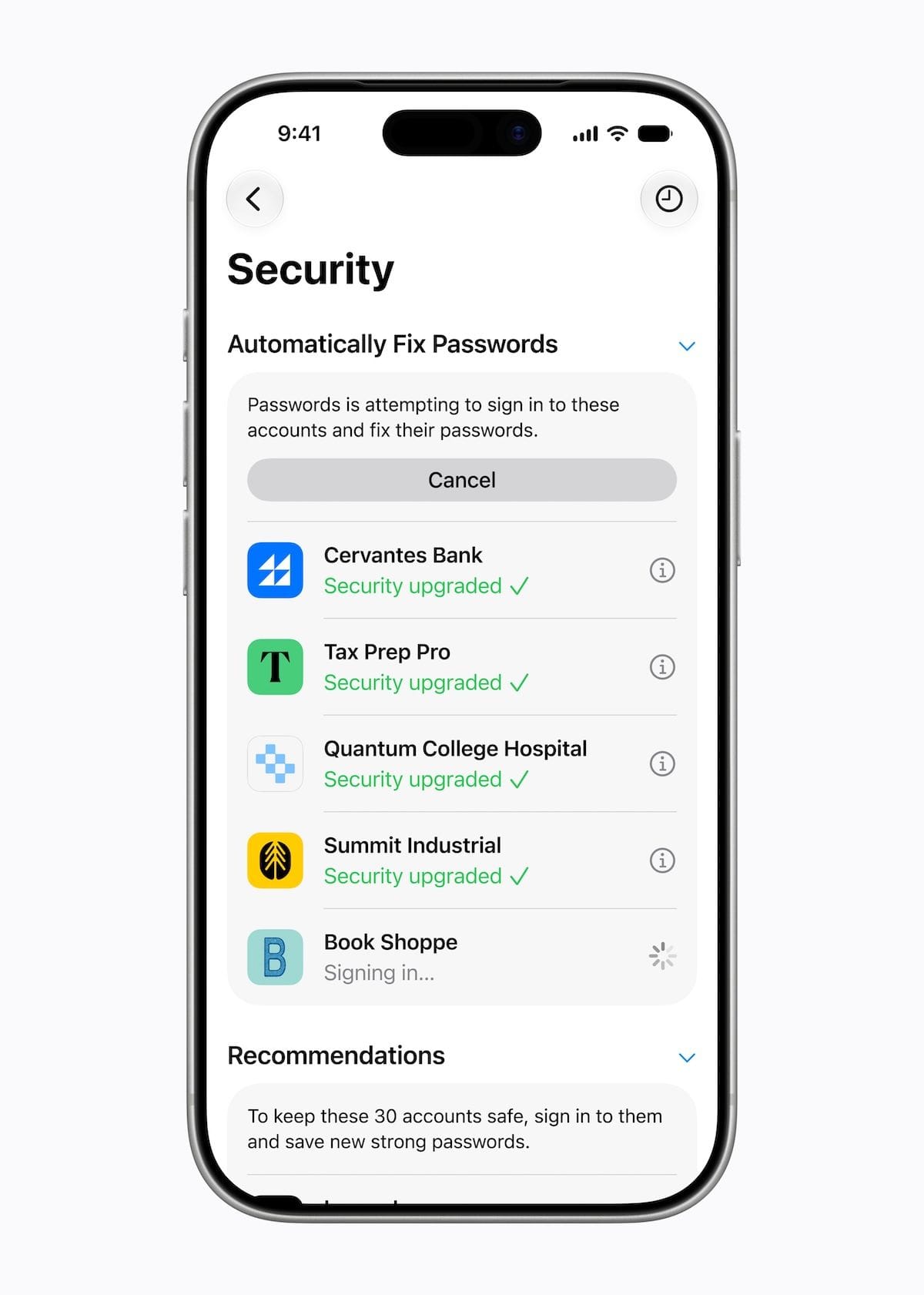
The Passwords app will alert you to weak or compromised passwords and change them for you on supported sites, handling the login and update with a single tap.
Yes, Apple missed badly in 2024 with its false start on the new Siri, but all indications are that it's hit the target this year, and we're finally getting the Siri and Apple Intelligence we've wanted.
Hundreds of improvements
Apple dedicated a big chunk of the keynote to performance and reliability across iOS, iPadOS, macOS, and watchOS. This is something we need as the bugs, performance issues, and general annoyances have been piling up over the last several years.
Right around the 6:22 mark of the keynote, Apple showed a slide listing 100s of improvements it's making throughout its platforms. Here are a few that caught my attention:
- Full-resolution photos and videos in iCloud Shared Albums
- More consistent window positioning persistence across external displays in macOS (this has been a complaint of mine for years)
- Faster AirDrop transfers
- Faster window switching in iPadOS
- Faster to start uploading to iCloud Photos
- Improved navigation heading and GPS accuracy in CarPlay
It's a massive list, organized by app, OS, or functional area on my site if you want to see them all.
These improvements won't generate breathless headlines, but they're the stuff you'll notice every day, because your things work the way they're supposed to.
If you have kids on Apple devices, read this section
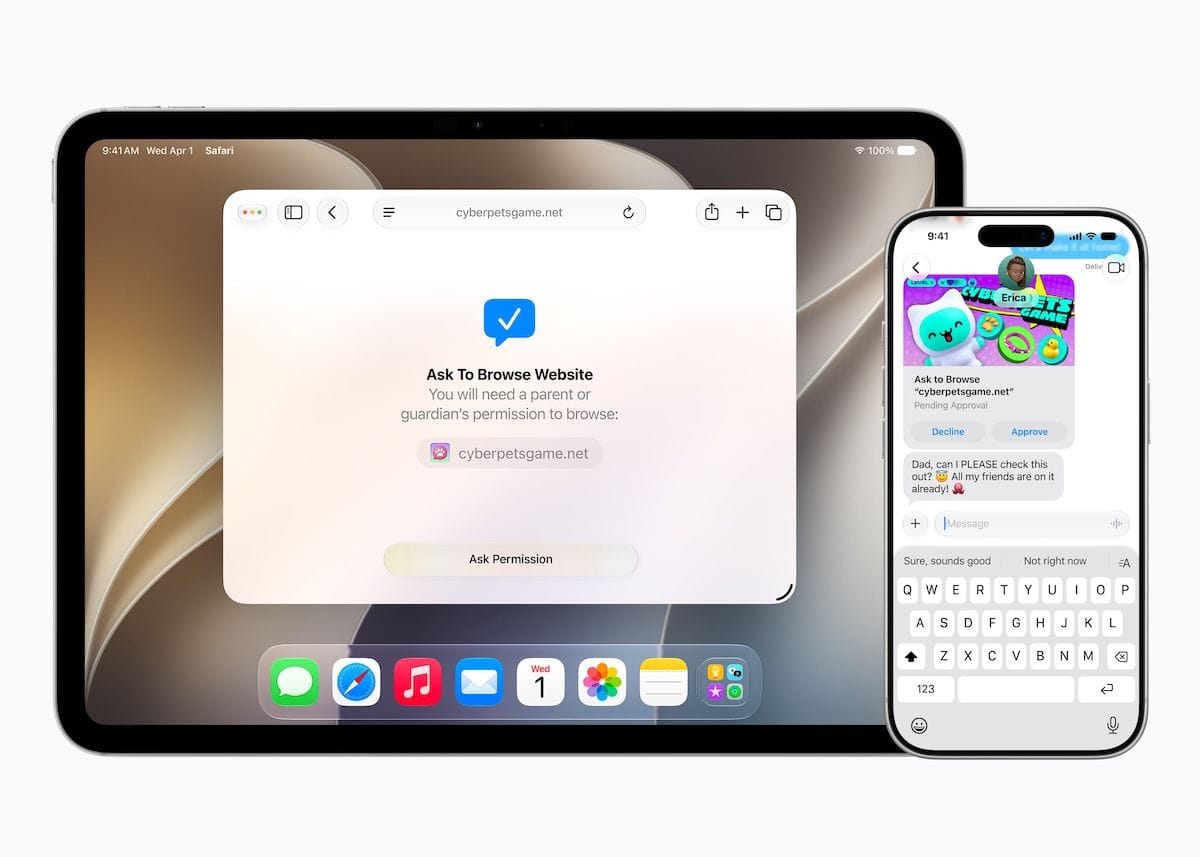
Apple is focusing on improving parental controls this year.
The headline addition is a proper Child Account setup. When you set up a kid's device, a guided process creates an age-appropriate experience from the start: only the apps you approve, adult websites blocked, and age-based restrictions in the App Store. It's required for children under 13 and available up to age 18.
Two features stand out. Ask to Browse works like the existing "Ask to Buy," requiring kids to get your approval before visiting any new website in Safari. Time Allowances is a more flexible take on Screen Time limits, letting you set specific access windows rather than hard cutoffs.
Apple's parental controls have been clunky and easy for determined kids to work around. The new tools, if they work as advertised, should be helpful to parents.
To beta, or not to beta
Developer betas are available now, but unless you're a developer or testing them in some work capacity, I highly recommend avoiding them. They're rough around the edges, especially this early in the testing cycle.
Public betas arrive in July, and they're generally more suitable for daily use, but even then, unless you can tolerate occasional bugs on a device you rely on, wait for the full release this fall.